The Processor we are working with is called Nios V Processor
Nios V Processor #
This is a processor from Intel with RISC-V Architecture
- This is a 32 bit processor, that’s because it’s 32 bits wide
- Thus the address sent to memory is also 32 bits, this means that there are $2^{32}$ address locations
We said that the word size of processor is 32 bits
- In this case, the most information can be accessed is 32 bits, but we can access 16 bits (Halfword), or 8 bits
Byte Addressable #
In modern Computer, we give one Byte one Address
- Image Memory as a lot of boxes, each box’s size is 8 bits, 1 Byte, in this case, each box will be given one unique Index (Address)
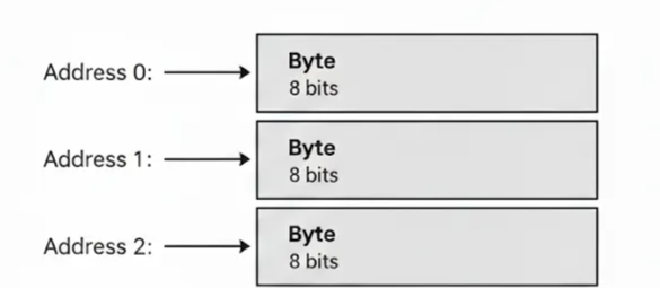
As mentioned, the processor we are using are 32 bits wide, that means each time it’s going to get 4 bytes, that is $4\times 8 =32$

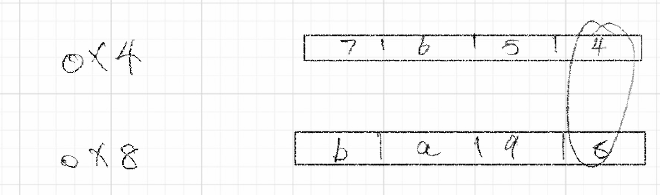
- So each time we access memory, we will get this 32 bits (4 Bytes) Bar,
Ex. A program that add three numbers from Memory #
Now we have three numbers on Memory, that are 10,20,30 on (0x2C),(0x30),(0x34)
.data
list:   .word 10, 20, 30      # Define an array of 3 words (4 bytes each)
answer: .word 0               # Reserve space for the final result

.text
.globl _start

_start:
    # --- PHASE 1: LOAD DATA FROM MEMORY ---
    la t0, list               # Load base address of 'list' into t0
    lw t1, 0(t0)              # Load 1st element (10) into t1
    lw t2, 4(t0)              # Load 2nd element (20) into t2 via offset 4
    lw t3, 8(t0)              # Load 3rd element (30) into t3 via offset 8

    # --- PHASE 2: PERFORM CALCULATIONS ---
    add t2, t2, t1            # t2 = t2 + t1 (20 + 10 = 30)
    add t2, t2, t3            # t2 = t2 + t3 (30 + 30 = 60)

    # --- PHASE 3: STORE RESULT BACK TO MEMORY ---
    la t0, answer             # Load address of 'answer' into t0
    sw t2, 0(t0)              # Store the final sum (60) into memory at 'answer'

done:
    j done                    # Infinite loop to terminate execution flow
- The
laandlwInstructions are called Executable Statements - The
.word 10, is Assembler Directive
Executable Statements #
Those are the instructions CPU will do when the program is running
Assembler Directive #
Assembler Directive are the things to show to Assembler, it means to Put Constant into memory into 32 bits at the next available location
In this case, we have
0x2C |
list = |
.word 10 |
|---|---|---|
0x30 |
.word 20 |
|
0x34 |
.word 30 |
|
0x38 |
answer: |
.word 0 |
la t0,list: Load Address (t0 <- list = 0x2c)- The
lainstruction actually include two encoded instructions, that is because both the instruction and the address are 32 bits, that makes we can’t give the 32 bits address and instruction at once, so we need two encoded instead
- The
Imagine this scenario, you ask a guy to take you to an address with 32 bits, however you only got 32 bits length of word to tell him, in this case you can’t give the Instruction of “Take me there” + “Address” at once
lw t1,(t0): Load the word from memory beginning at address given byt0- So
t1 <- (t0) = (0x2c) = 10
- So
()is just like Dereferencing a Pointer
lw t2,4(t0): When we use4(t0), this is like a Index Offset, similar to the concept of array in C,t0stores an address, and4(t0)is then just referencing the word in0x2c + 4- So
t2 <- (0x30) = 20
- So
lw t2,8(t0): The samet3 <- (0x34) = 30
Now we are going to add those
add t2, t1, t2   # t2 = 10 + 20 = 30
add t2, t2, t3   # t2 = 30 + 30 = 60
la t0,answer
sw t2,(t0)
la t0,answer: load the Address ofanswerin Memory to Registert0in Processor- Then Store Word in
t2to the “Dereferenced Pointer”(t0)
The reason why we can’t use
sw t2,(answer)is because RISC-V only allows Register in brackets
Accessing Half Words & Bytes #
As NIOS-V are byte accessible processor, that means we need to at least get one byte once
- However, the fact that processors are all 4 bytes (32 bits) makes it hard to store more than one Half Word (2 Bytes) or Byte (1 Byte) into a Register
- So that means no matter the length of data we are choosing, i.e. Full Word, Half Word, or Byte, it’s gonna take the whole Register
Recall that we Load Word using lw t2,(t3) , that is load the word t3 register is pointing to in the memory to register t2
- We can do the same with Half Word using
lh t2,(t3) - Though as indicated, a Register is 32 bits, with only 16 bits stored, that makes the rest 16 bits left empty, so that we need to use Sign Extension to deal with the rest
Sign Extension #
When we want to increase the digit of a Binary Number without changing its value and Sign
- Looked at the old Binary’s highest digit (Sign Digit)
- Change all before to the same value
For example having 0000 0101 , that’s +5, if we want to extent it to 16 bits, it should be 0000 0000 0000 0101
So that’s what we do when storing Half Word into a Register
- Though there are also method to leave the rest of Register unsigned, using
lhu A,(B)
Store Data from Register to Memory #
The way storing Word, Half Word, and Byte into memory is kind of the same, which is using sw , sh ,and sb
Address for Data in Memory #
If needed to store a word in memory, then its address need to be divisible by 4
- Assume having a Memory with Address 0,1,2,3
- If we want to store a word, then it’s address has to start on 0, 4, 8, 12, and can’t start with 1,2,3
- The same apply for Half Word and Byte, Half Word has to start on 0,2,4,6, but Byte can be on any
Move Instruction #
Move Instruction #
mv t3,t2 allows us to move the data in one Register t2 to t3
- Having the General Form of
mv rd,rs #rd <- rs
Store Constant #
If we want to store a constant for example 44 into Register, the we should use command li s3,44 #s3 <- 44
- This constant
44will be Encoded by assembler into 32 bit number and store into Register - While this
44is called Immediate Constant
Immediate Constant #
When dealing with constants, the command usually ends with a i
- For example
addi rd,rs,const #td <- ts + const
Load Instruction #
lw rd,D(rs1) #rd <- (rs1+D)
- This load a 32 bit number into
rdfrom memory address @rs1+D Dis also a 12 bit signed Immediate Constant encoded & Sign Extension
Storing a Register #
sw rs2,D(rs1)
- Copy
rs2into Memory at addressD+rs1
Logic Instruction #
Logic & Shift Instruction are bitwise, they compare each bit one by one for the result
xxx rd,rs1,rs2 , xxxi rd,rs,Immed
xxx: one of AND, OR, XOR
Ex. Logic AND Instruction #
$$ \begin{aligned} &\text{and} \quad t_3, t_1, t_2 \\ \\ &001 \quad 011 \quad (t_1) \\ \text{AND} \quad &001 \quad 101 \quad (t_2) \\ \hline &001 \quad 001 \quad (t_3) \end{aligned} $$Ex 2. Logic OR Instruction #
$$ \begin{aligned} &\text{ori} \quad t_2, t_1, 0x7 \\ \\ &010 \quad 101 \quad (t_1) \\ \text{OR} \quad &000 \quad 111 \quad (0x7) \\ \hline &010 \quad 111 \quad (t_2) \end{aligned} $$Shift Instruction #
Shift Instruction are just like the >> in c++
srli t2,t1,3
- Shift right
t1by Immediate Constant of digits - i.e. if
t1is110...110, then it becomes000110..., which means that the last three bits has been discarded after
sll rd,rs1,rs2
- There’s also a Shift Left Command
sra rd,rs1,rs2
- Keep the highest digit when shifting right