Parts of Computer #
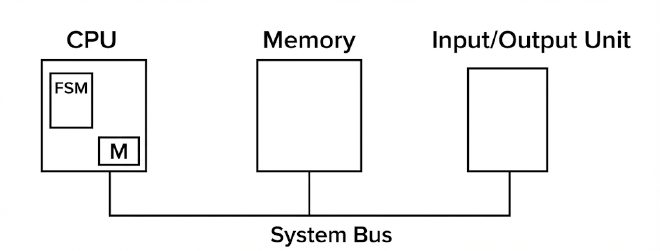
Modern Computer contains three parts, CPU, Memory and Input/Output, they are connecting by the System Bus
CPU - Central Processor Unit #
CPU basically contains a FSM - Finite State Machine, that controls
- What happens
- When it happens
- Arithmetic Logic Unit (ALU): Unit that computes (i.e. Add or Subtract)
All things on CPU are being compute on Registers
The Processor we used is called AHero Mros V, it has Thirty Two, 32 bits Register
- Registers are named x0 → x31
- And Each of those have a second name, that’s x0 is called $zero$, $x1$ is called ra, $x2$ is called $sp$ … and x31 is called $t6$
Memory #
Memory is the place where computer store data, it has
- Approximately 1 billion bytes, while each of those has a separate address
- The most frequency operation inside Memory is the conversion between base 2 and base 16
- Memory stores
- data, variables, and data structures
- Program being executed by computer
Processor #
Processor are being programmed in Assembly Language, which is the thing that translate human instructions into machine Code
Assembly Language #
For us, human, we know English as our language, things like Add, Subtract, Load makes sense to us, however for machine, they only know 0 and 1, thus 0 and 1 is not only the way it stores data, but also it’s way to read instruction
- While Assembly Language is the bridge in between
- We named each instruction in binary one English word, i.e.
00000isadd,00001issubtract - In this way, every time we write
add, the machine knows exactly we mean00000, thus can run the things we expected then
C Language #
The following session will show a example of C Language code in different aspects
| C Language | Assembly Instruction | Function of Instruction |
|---|---|---|
int A,B,C,D |
No Instruction | |
A = 1 |
li t0,1 |
Register t0 <- 1 |
B = 8 |
li t1,8 |
Register t1 <- 8 |
C = A + B |
add t2,t0,t1 |
t2 <- t0 + t1 |
D = B - A |
sub t3,t0,t1 |
t3 <- t1 - t0 |
i loop: j iloop |
Infinite Loop |
i loop: j iloop: The Processor doesn’t actually stop, so we need to create a infinite loop to stop the program there
Compile Sequence #
When we are trying to “run” the program on the processor, we actually need steps in between to make it work
gmate program: Turns FPGA into computer
- FPGA can be turned into anything wanted, and this firstly turn the hardware into a computer
gmate complie: Compile the Assembly Language into machine codegmate download: Download the Machine Code on the boardrun GDB: Start tracking things happening on the board
Branch #
Branch is just like the if-else , it help the program to run different task under different conditions
- A example would be
i loop: j iloopmentioned before, thisjis jump, thus this is a branch with the function of, when seeingi loop, then jump toi loop(Infinite Loop)
Labels #
Labels are the name for a specific Address, for example inside i loop: j iloop , i is just a label, it’s just a name and can be anything else
Conditional Branch #
This is really the if-else , only go to one label under given condition
- If the condition doesn’t meet, simply go to the next in sequence
Ex. A counter using Conditional Branch #
The thing we are trying to implement here is for(int i = 1;i=4;i++); in assembly language
.global start
_start: li t0,1
				li t1,4
myloop: add t0,t1,1
				ble t0,t1,myloop
				fin: j fin
.global start: The entry point of the programli t0,1: Loadt0 <- 1add t0,t1,1: Addt1and1, and store the result tot0ble t0,t1,myloop: Theblehere stands for branch less or equal to, so ift0 <= t1, the jump tomyloop, otherwise go to the next in sequence which isfin
So after finish analysis the codes, we can now look the whole program once
- Firstly
t0is given 1,t1is given 4, then we will go through
1 <= 42 <= 43 <= 44 <= 4fin: j fin
- Thus is a counter from 1 to 4
Instruction #
Every line above inside the code bar are instructions, each instruction is 4 bytes length
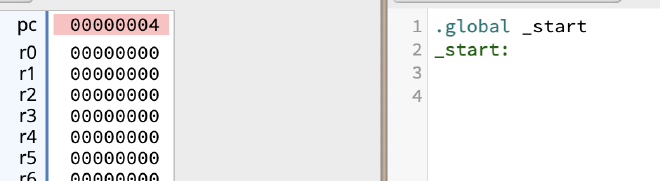
- The Address of instruction is reflected by
pc